Legacy View
- 4.6
- Rating
- 50.00K
- Installs
- Free
- Price

 Analysis by App-foxy
Managing a water treatment system is rarely something I want to think about during a busy day. I usually notice it only when something seems wrong: water feels different, a service task is due, or I realize I have not checked the system in far too long. Legacy View, developed by Chandler Systems, is designed to make that equipment easier to monitor and control from a phone. After spending time with it, I see its value less as an exciting new app and more as a practical companion for a specific household job.
That distinction matters. This is not a general smart-home dashboard, a water-quality education tool, or a replacement for a technician. It is a dedicated House & Home app for people whose water treatment setup works with Chandler Systems equipment. If that describes your home, it can turn an otherwise invisible appliance into something you can check when it suits you. If it does not, there is no reason to keep it installed simply because the interface sounds useful.
From the first week to the routine that follows
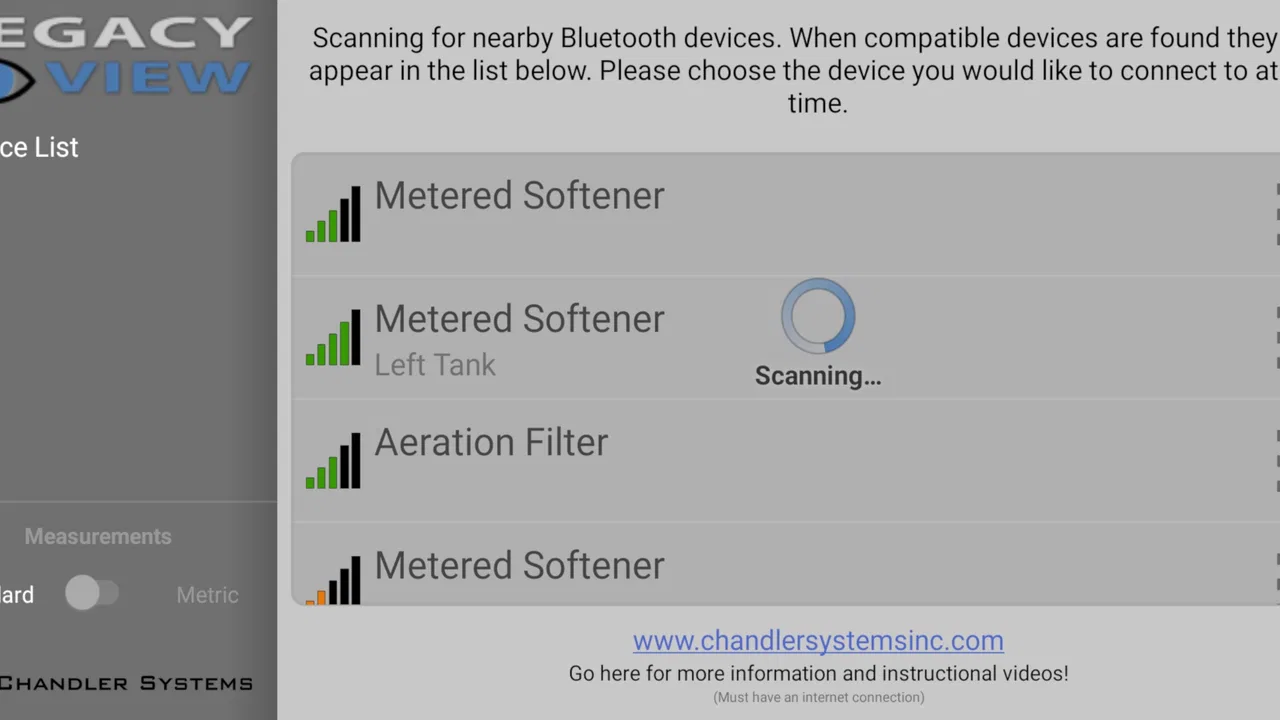
The first-week appeal comes from visibility. A water treatment system is often installed in a basement, utility room, garage, or another place I do not visit casually. Legacy View gives that equipment a presence on my phone, so I can approach it as part of a normal household routine rather than waiting for an obvious problem. The store summary describes the app as providing information and control for a Chandler Systems water treatment system, and that is the right way to understand its purpose.
You May Also Like

 AccuWeather: Weather Radar
AccuWeather Review: A Quick, Clear Forecast for Everyday Decisions
For everyday plans, the best forecast is the one you can understand quickly. AccuWeather makes rain timing, radar, and local conditions easy to act on, with a few trade-offs.

 Hill Climb Racing
Why Hill Climb Racing Still Turns Crashes Into One More Run
A tiny car, a bumpy hill and one more upgrade: Hill Climb Racing keeps resurfacing because its simple chaos makes every near-miss feel personal.

 AliExpress - Shopping App
AliExpress Makes Global Shopping Feel Personal, but Shoppers Bear the Risk
AliExpress turns a global marketplace into a pocket-sized discovery engine. Its reach is useful, its shopping loop compelling, and its trade-offs easy to miss.

 Lords Mobile: Kingdom Wars
Lords Mobile Is a Kingdom-Building Routine, Not a Quick Match
A case-by-case verdict on the building, battles, device demands, and social commitments that make Lords Mobile rewarding for some players and exhausting for others.

 PDF Scanner app - TapScanner
TapScanner Makes Paperwork Easier to Capture, Check, and Share
TapScanner makes scanning with a phone feel less like a rescue operation and more like a dependable step in getting work done. Its capture tools are useful, though not flawless.

 Block Blast!
 Shows How Much a Puzzle Game Can Leave Out
A quiet grid game shows why puzzle players increasingly value instant clarity, repeatable skill and low-pressure play—and where the genre still needs to catch up.
More From Our News Desk
View All News


During initial use, I would focus on learning what the app shows before changing anything. The most useful first step is to compare the information on the screen with what I can see at the equipment itself. That creates a reference point: I know which system I am viewing, what its current state looks like, and which controls are genuinely relevant to my installation. This is more valuable than tapping through every available option without knowing what a change will do.
There is also a practical reason to avoid treating remote control as a toy. Water treatment settings affect an appliance connected to the home’s water supply. I would use the app to understand the system and make deliberate adjustments, not to experiment repeatedly. A remote button can feel reassuring, but convenience does not remove the need to know why a setting is being changed.
One of the better early workflows is to check Legacy View at the same time as another household task. I might open it while checking the utility room, replacing supplies, or doing a general home-maintenance round. That makes the app part of a real habit instead of a novelty that disappears after installation. The app is most useful when it reduces the effort needed to remember the system, not when it becomes another notification-heavy obligation.
For a homeowner who has inherited a treatment system and is unsure how often it needs attention, this initial period can also provide orientation. The app does not magically explain every plumbing situation, but it gives me a place to begin observing the equipment. I can learn what normal operation looks like for my household before I need to react to an unusual result.
What makes the app worth trying
Legacy View is free, carries an Everyone content rating, and has reached over 50 thousand installs. Its average rating is 4.6 from around 1.2 thousand ratings, with 159 written reviews. Those figures suggest that the app has found a real audience among people who need this particular connection, although they should not be mistaken for proof that it suits every water system.
The strongest reason to try it is not the number of downloads. It is the match between the app and the equipment. A general smart-home app may be excellent for lights, thermostats, cameras, or locks, yet still be useless for a Chandler Systems treatment unit. Legacy View earns attention because it addresses a narrow task that broader home apps normally ignore.
I also appreciate that the app is not asking me to turn water treatment into a hobby. The best experience is quiet: open it when I need information, make a considered change when appropriate, and close it. That restrained role is a strength for anyone who wants useful control without building an elaborate automation setup around a single appliance.
How the value changes after the first month
The first month is when I would decide whether Legacy View deserves permanent space on my phone. The initial curiosity fades quickly, so the question becomes simple: does it help me maintain awareness of the system with less effort than the usual alternatives?
The usual alternative is physical inspection. I can walk to the treatment equipment, read whatever is available there, and operate it locally. That approach has one clear advantage: I am already beside the device, so I can inspect the surrounding hoses, connections, salt or treatment materials, and signs of leaks at the same time. Legacy View cannot replace that visual check. Its advantage is convenience when I want information before making the trip or when the equipment is located somewhere inconvenient.
Another alternative is relying on memory. Many households do this until a maintenance task is overdue or a change in water quality forces attention. The app is better suited to a household where responsibility is shared or easily forgotten. I can check the system without asking who last looked at it, and another person in the home can use the same general source of information rather than relying on an informal handoff.
A third alternative is calling a service professional whenever a question comes up. Professional help remains the right choice for installation problems, leaks, unusual water behavior, or uncertainty about treatment settings. However, an app can reduce unnecessary calls for basic status checks and routine awareness. That distinction is important: Legacy View is a way to be more informed before contacting a technician, not a substitute for one.
The recurring value is therefore situational. If I have a treatment system in a difficult-to-reach location, or if I manage a property from a distance, remote information can justify keeping the app. It may also help when several people share responsibility for the home. On the other hand, if I live in a small home, regularly pass the equipment, and already have a reliable maintenance routine, the phone-based layer may feel unnecessary after the first few weeks.
A useful monthly habit is to open the app before a planned household check, not after something goes wrong. I would note the system’s displayed condition, then compare it with the physical equipment and any recent changes in water use. This creates a simple pattern of observation. It is more dependable than opening the app only when I am worried, because concern tends to make small differences look more serious than they are.
Maintenance is still a physical responsibility
The biggest misconception I would avoid is assuming that app access equals automatic maintenance. Legacy View can make information and control more convenient, but the treatment system still exists in the real world. Supplies may need attention, fittings can require inspection, and the surrounding area can reveal problems that a phone screen cannot show.
I would treat the app as one layer in a maintenance routine. First, check what the app reports. Then, when the situation calls for it, inspect the equipment itself. If the two views do not seem to match, I would not keep changing settings in search of an explanation. I would pause, record what I observed, and consult the equipment documentation or a qualified service professional.
This two-step approach is one of the most useful ways to avoid overconfidence. Remote information is convenient precisely because it removes the need to stand next to the appliance. That is also its limitation. Without seeing the physical setup, I may miss a small leak, an empty supply container, a disconnected line, or another issue outside the app’s view.
For renters or people who did not choose the treatment equipment, the app may have a different role. It can help them understand the system they are expected to live with, but they should be careful about changing controls that belong to a landlord, installer, or service agreement. In that situation, the best use may be observation and communication rather than independent adjustment.
For homeowners, I would keep a short note of any important changes made through the app. It does not need to become a formal logbook. A date, the reason for the change, and the result can be enough to prevent confusion later. This is especially helpful when more than one person manages the property or when a technician needs a clear account of what happened.
Where long-term fatigue can appear
The main source of fatigue is that the app serves a narrow purpose. A weather app, messaging app, or calendar earns frequent attention naturally. Legacy View does not. If the water treatment system runs quietly and the home’s water feels normal, I may have little reason to open it. That is not necessarily a flaw in the app; it is a consequence of managing equipment that should often be uneventful.
There is also a risk of checking too often. Repeatedly opening a control app without a clear reason can turn a useful tool into another small digital chore. I would rather use a predictable schedule tied to household maintenance than create a habit of casual checking. The app should reduce mental load, not add another stream of information to monitor.
Remote control can create a second kind of tiredness: uncertainty about consequences. If I am away from home and see an unfamiliar status, I may be tempted to make a change simply because I can. That is where restraint matters. The app’s convenience is most valuable when I already understand the purpose of the action. For unfamiliar warnings or behavior, physical inspection and professional advice are safer than remote guesswork.
Compatibility is another decisive consideration. Legacy View is specifically connected to Chandler Systems water treatment equipment. Someone looking for a universal controller for unrelated brands should skip it, even if the category sounds relevant. Likewise, a person who wants detailed household water testing, broad smart-home automations, or a complete plumbing diagnostic service should look elsewhere. This is a focused tool, and its focus is both its reason to exist and its boundary.
The app’s age is worth considering in a practical way. It was released on October 20, 2015, and the current version is 6.18.2. It supports devices running Android 6.0 or later. That broad operating-system requirement may help people using older compatible phones, but I would still judge the experience by how well it fits my current device and household setup rather than assuming that long availability guarantees a perfect experience for every user.
Interface friction matters more in a utility app than in an entertainment app. If I open it only occasionally, I need the information and controls to be understandable without relearning the whole product each time. I would pay attention to whether the system connection remains dependable, whether the displayed information is easy to interpret, and whether controls make their effect clear. Those are the details that determine whether I keep returning after the novelty has gone.
Who will keep using it
I think Legacy View is most useful for a homeowner with a compatible Chandler Systems treatment setup who wants a convenient way to stay informed. It is particularly appealing when the equipment is tucked away, when household maintenance is shared, or when the property is not visited every day. In those situations, the app can turn a forgotten appliance into something easier to include in a normal routine.
It may also suit someone who is methodical about home care but does not want to maintain a complicated smart-home system. The app’s narrow purpose can be an advantage: I do not need to connect every appliance in the house to gain value from checking this one. A short monthly review, combined with occasional physical inspection, is a realistic long-term pattern.
I would skip it if the treatment system is not made for Chandler Systems, if I expect universal equipment support, or if I am seeking a replacement for professional diagnosis. I would also hesitate if I know I will never use remote information and the equipment is already easy to inspect locally. In that case, the app may add another login and another maintenance reminder without solving a real problem.
Before installing, I would confirm that the household system is one the app is intended to work with and that the phone meets the Android requirement. After installation, I would identify the correct equipment, learn the normal display, and avoid changing settings until I understand their purpose. Those three steps prevent the most common disappointment: expecting a general home-control app and discovering a specialized companion instead.
My long-term verdict
After the first-week appeal fades, Legacy View earns its place through modest, recurring usefulness rather than constant engagement. I would not recommend it as an essential app for everyone, and I would not keep it installed merely because it has a strong average rating. Its value depends almost entirely on owning or managing the compatible water treatment equipment.
For the right household, the free price removes the main barrier to trying it. The app gives me a more convenient way to check and control a system that is otherwise easy to forget, while still leaving physical inspection and professional support where they belong. That balance is important: the best long-term use is informed convenience, not remote experimentation.
My recommendation is therefore straightforward. If Chandler Systems equipment is part of your home and you sometimes struggle to remember or reach it, Legacy View is worth installing and testing as part of a simple maintenance routine. Give it a few weeks, connect its use to real household checks, and see whether it saves effort. If your system is unrelated, your needs are broader, or local inspection is already effortless, skip it. In my experience, this is a focused utility that can become quietly valuable—but only when its narrow purpose matches the home it is serving.
FAQs for Legacy View
01What is Legacy View, and what can I use it for?
Legacy View is an application designed to give users access to older or legacy content, services, or features through a more familiar interface. Its exact purpose can depend on the version and platform you install, so it is worth checking the official store description before downloading. In general, the app is useful for people who prefer a classic experience or need compatibility with older resources.
02Is Legacy View free to download and use?
Legacy View may be available as a free download, but some functions can depend on the service connected to the app, account permissions, or optional purchases. Before installing it, review the listing for subscription details, advertising information, and possible in-app payments. Also check whether certain legacy features require an existing account, paid access, or authorization from an organization.
03Which devices and operating systems support Legacy View?
Compatibility can vary between Android and iOS versions, as well as between phones and tablets. Before downloading Legacy View, check the minimum operating-system requirement shown on the official Google Play or App Store page. Older devices may install the application but provide a less reliable experience, particularly when the app depends on modern security standards, online services, or background connectivity.
04Does Legacy View require an internet connection or an account?
In most cases, an app focused on accessing legacy services needs an internet connection to sign in, synchronize information, or retrieve content from a remote system. Some previously loaded material may remain available offline, but this should not be assumed. You may also need to create an account or use credentials supplied by the relevant service, institution, or administrator.
05Is Legacy View safe to install and what permissions might it request?
Download Legacy View only from a trusted official store or a verified source, and confirm that the developer name matches the service you intend to use. During setup, review permissions carefully; the app may request access related to notifications, storage, network connectivity, or account information. Avoid granting permissions that seem unrelated, and keep both the application and your device operating system updated.
Pros
- Simple interface makes browsing legacy content easy.
- Useful for accessing older documents and archived information.
- Lightweight design should work well on modest devices.
- Quick navigation between available views and sections.
- Helpful option for users who need a familiar legacy-style experience.
Cons
- Limited modern features compared with newer viewing apps.
- Interface may feel dated for users used to current design standards.
- Compatibility may vary across Android and iOS devices.
- Some content or functions may require additional setup.
- Updates and long-term support may not be as frequent as larger apps.

Legacy View
Gallery